InfoComm 2026Meet Pickcel at InfoComm India 202616–18 SeptemberJWCC MumbaiBooth G37View Event Details→Meet Pickcel at InfoComm IndiaBooth G37View Details→
Pickcel

Core Platform

  • Software Features
  • Templates
  • Security & Compliance

Enterprise

  • On-Premise
  • Integrations & Automation
  • Our Services

Extensions & Apps

  • Mobile App
  • App Integrations

Digital Signage Players

  • Android
  • Samsung Tizen
  • BrightSign
  • Amazon Signage Stick
  • View all Players
What is Digital Signage?

Learn the basics of digital signage and how it can transform your business.

Industries We Serve

  • Office
  • Retail
  • Restaurant
  • Manufacturing
  • Hospitality
  • Healthcare
  • Transportation
  • Education
  • View all Industries

Solutions

  • Dashboard
  • FIDS
  • Digital Menu board
  • Car Dealership App
  • Wall Craft
  • Event Stream
  • Transport PIS
  • Social Wall
  • View all Solutions
See How Pickcel  Helped Amazon
See How Pickcel Helped Amazon

Case Studies

  • Mercedes-Benz
  • Accenture
  • Magnolia Bakery
View all

All Resources

  • Digital Signage Blog
  • Learn
  • Digital Signage Gallery
  • Case Studies
  • Support
  • Download
Partnerships
Partnerships

Partnerships

  • White-Label
  • Reseller
Pricing
Login
OverviewProblemSolutionCapabilitiesDemoComparisonFAQ

Building Directory Software That Updates in Seconds, Not Weeks

Printed lobby directories go wrong the moment a tenant moves or renames. Pickcel turns any screen into a directory your front desk can update from a browser, no vendor visit, across every building you manage.

No credit card required.
Get Started
Pickcel reviews on Capterra and G2
Pickcel building directory dashboard showing a tenant listing update
9,000+
businesses
150,000+
screens deployed
70+
countries
99.99%
uptime
The Problem

The Problem With Static Building Directories

Facilities teams managing multi-tenant buildings run into the same three failures, no matter how carefully the original directory was designed. Readers who want the category overview first can start with Pickcel's guide to digital building directories before returning here for the buying decision.

Tenant Turnover Outpaces the Printed Board

A tenant moves floors, subleases a suite, or rebrands mid-lease, and the lobby board is wrong the same day. Fixing it means a call to a signage vendor, a design proof, a print run, and an install visit, often two to three weeks from request to correction. Every visitor who trusts the board during that window ends up on the wrong floor.

The Front Desk Absorbs the Wayfinding Questions

When the directory is stale or hard to scan, visitors default to asking whoever is nearest, usually the front desk or building security. A property with heavy tenant turnover can generate dozens of these interruptions a week, pulling staff away from the tasks they were actually hired to do.

Portfolio Managers Have No Single View of Every Lobby

A property manager running five buildings has five separate directories, updated by five different vendors on five different schedules. There is no way to confirm, from a desk, that a specific listing is correct in every lobby right now, only a series of assumptions until the next site visit proves one of them wrong.

How Pickcel Runs a Building Directory

01

Front Desk or Tenant Edit

listing change made from any browser

Pushing update to all stores…0%
02

Pickcel Cloud Platform

publishes instantly, no export, upload, or device restart

  • Downtown Flagship24 Screens
  • Airport Store18 Screens
03

Directory Screens

every connected lobby screen in the building

04

Visitors & Staff

search by name, suite, or category and get a floor in seconds

Ready for viewers

Live on the floor

Live — Pushing content from HQ to your stores…
The Solution

How Pickcel Solves It: Problem-to-Capability Mapping

Problem You Have Today

A tenant moves or renames and the lobby board is wrong for weeks

How Pickcel Handles It

Browser-based listing editor with instant publish to every screen

What You Get

Listing changes publish from a browser, no vendor visit

Problem You Have Today

Front desk staff field the same wayfinding questions every day

How Pickcel Handles It

Self-service directory screen with searchable listings and floor maps

What You Get

Fewer interruptions at the front desk, faster visitor wayfinding

Problem You Have Today

Portfolio managers cannot confirm every lobby shows the right listings

How Pickcel Handles It

One cloud dashboard covering every building's directory screens

What You Get

A single view of directory accuracy across the whole portfolio

Problem You Have Today

Multi-building rollouts take months to standardize

How Pickcel Handles It

Template-based directory design pushed to any number of screens at once

What You Get

New buildings live on the same directory standard in days, not months

Problem You Have TodayHow Pickcel Handles ItWhat You Get
A tenant moves or renames and the lobby board is wrong for weeksBrowser-based listing editor with instant publish to every screenListing changes publish from a browser, no vendor visit
Front desk staff field the same wayfinding questions every daySelf-service directory screen with searchable listings and floor mapsFewer interruptions at the front desk, faster visitor wayfinding
Portfolio managers cannot confirm every lobby shows the right listingsOne cloud dashboard covering every building's directory screensA single view of directory accuracy across the whole portfolio
Multi-building rollouts take months to standardizeTemplate-based directory design pushed to any number of screens at onceNew buildings live on the same directory standard in days, not months

ROI at a Glance

ROI at a Glance

Real impact. No recurring hassle.

Under 1 minute

The time it takes a listing change to publish to every directory screen in the building, from any browser.


Product behavior, not a benchmark claim.

$0 marginal cost per listing change

A printed board correction typically runs through a design proof, a print run, and a vendor site visit, a recurring cost each time a tenant changes.


Estimate based on a standard reprint-and-install cycle. Not attributed to a named study.

Platform Capabilities

Capability Highlights

Instant Listing Updates

A listing edit made from any browser publishes to every connected directory screen in the building within a minute, with no export, upload, or device restart required.The editor sits inside the same Pickcel digital signage platform used for the rest of a building's signage, so a front-desk employee changing a tenant name does not need a second login or a separate tool. Changes queue instantly and push over the existing network connection each screen already uses for its content schedule. The underlying editor mechanics are documented in full on Pickcel's building directory app page.

Pickcel building directory editor publishing a listing update to lobby screens

Self-Service Directory Search

Visitors search a directory by tenant name, suite, or category and get a floor and direction in a few taps, without approaching the front desk.The search index rebuilds automatically every time a listing changes, so a newly added tenant is searchable the moment their entry publishes. For buildings with heavy footfall, a self-service search screen absorbs the bulk of routine wayfinding questions that would otherwise land on reception staff. A directory answers who is in the building and on which floor; for the step-by-step routing once a visitor has that answer, see Pickcel's wayfinding signage.

Self-service lobby directory screen with searchable tenant listings

Multi-Building Dashboard

Portfolio managers see every building's directory screens, online status, and last listing update from a single dashboard, without visiting each site.Pickcel already manages 150,000+ screens across multi-site portfolios worldwide, and a five-building regional deployment runs on the same dashboard architecture as that global footprint. Filtering by building, region, or listing status turns a task that used to require five separate vendor logins into one screen.

Multi-building directory screens managed from a single Pickcel dashboard

Role-Based Tenant Access

Property staff can grant a specific tenant contact edit rights to only their own listing, while every other listing on the same directory stays locked from that tenant's view.Permission levels are set per user, not per building, so a property manager running twelve buildings assigns tenant-level access once and it applies consistently across the portfolio. Building staff retain full oversight and can revoke tenant access instantly if a lease ends or a contact changes.

Role-based tenant listing access in the Pickcel building directory app

Security and Device Management

Pickcel holds SOC 2 Type II and ISO 27001 certification, and every directory screen is managed under the same role-based access and remote monitoring as the rest of a building's signage estate.Directory data such as tenant names, suite numbers, and logos is not sensitive in the way visitor data can be, but it still sits inside Pickcel's certified cloud infrastructure with the same audit trail applied to every account action. Device health monitoring flags an offline directory screen before a visitor encounters a blank board.

Remote publishing and device management for building directory screens

Instant Listing Updates

A listing edit made from any browser publishes to every connected directory screen in the building within a minute, with no export, upload, or device restart required.The editor sits inside the same Pickcel digital signage platform used for the rest of a building's signage, so a front-desk employee changing a tenant name does not need a second login or a separate tool. Changes queue instantly and push over the existing network connection each screen already uses for its content schedule. The underlying editor mechanics are documented in full on Pickcel's building directory app page.

Pickcel building directory editor publishing a listing update to lobby screens

Self-Service Directory Search

Visitors search a directory by tenant name, suite, or category and get a floor and direction in a few taps, without approaching the front desk.The search index rebuilds automatically every time a listing changes, so a newly added tenant is searchable the moment their entry publishes. For buildings with heavy footfall, a self-service search screen absorbs the bulk of routine wayfinding questions that would otherwise land on reception staff. A directory answers who is in the building and on which floor; for the step-by-step routing once a visitor has that answer, see Pickcel's wayfinding signage.

Self-service lobby directory screen with searchable tenant listings

Multi-Building Dashboard

Portfolio managers see every building's directory screens, online status, and last listing update from a single dashboard, without visiting each site.Pickcel already manages 150,000+ screens across multi-site portfolios worldwide, and a five-building regional deployment runs on the same dashboard architecture as that global footprint. Filtering by building, region, or listing status turns a task that used to require five separate vendor logins into one screen.

Multi-building directory screens managed from a single Pickcel dashboard

Role-Based Tenant Access

Property staff can grant a specific tenant contact edit rights to only their own listing, while every other listing on the same directory stays locked from that tenant's view.Permission levels are set per user, not per building, so a property manager running twelve buildings assigns tenant-level access once and it applies consistently across the portfolio. Building staff retain full oversight and can revoke tenant access instantly if a lease ends or a contact changes.

Role-based tenant listing access in the Pickcel building directory app

Security and Device Management

Pickcel holds SOC 2 Type II and ISO 27001 certification, and every directory screen is managed under the same role-based access and remote monitoring as the rest of a building's signage estate.Directory data such as tenant names, suite numbers, and logos is not sensitive in the way visitor data can be, but it still sits inside Pickcel's certified cloud infrastructure with the same audit trail applied to every account action. Device health monitoring flags an offline directory screen before a visitor encounters a blank board.

Remote publishing and device management for building directory screens
Rollout and Ownership

Rollout and Ownership: Who Actually Keeps This Updated

Pickcel assigns update ownership explicitly, at the account level, so this is settled before go-live rather than debated after the first stale listing appears. Directory software fails in practice when nobody knows who owns the update, not when the technology is missing a feature.

A single front-desk employee or building operations lead can own every listing for a building, updating names, suites, and categories as tenants move. For properties that prefer a lighter-touch model, individual tenants can be granted edit rights to their own listing only, which removes the update from building staff entirely for routine changes like a new logo or a rebrand.

Multi-building rollouts follow a template model. A property team standardizes a directory layout once, then pushes that layout to every new building added to the account. A twenty-building portfolio onboarding for the first time typically has its first directory screen live within a day of account setup, with the remaining buildings following at whatever pace hardware installation allows, not software configuration. This template pattern shows up often in corporate lobby deployments, where portfolio teams standardize the office building directory once and scale it to every new site added to the account.

Ownership does not require a technical background. Every action available to a front-desk user or tenant contact happens inside a standard web form: type a name, pick a suite from a dropdown, upload a logo. There are no file formats to learn and no separate software to install on the lobby device.

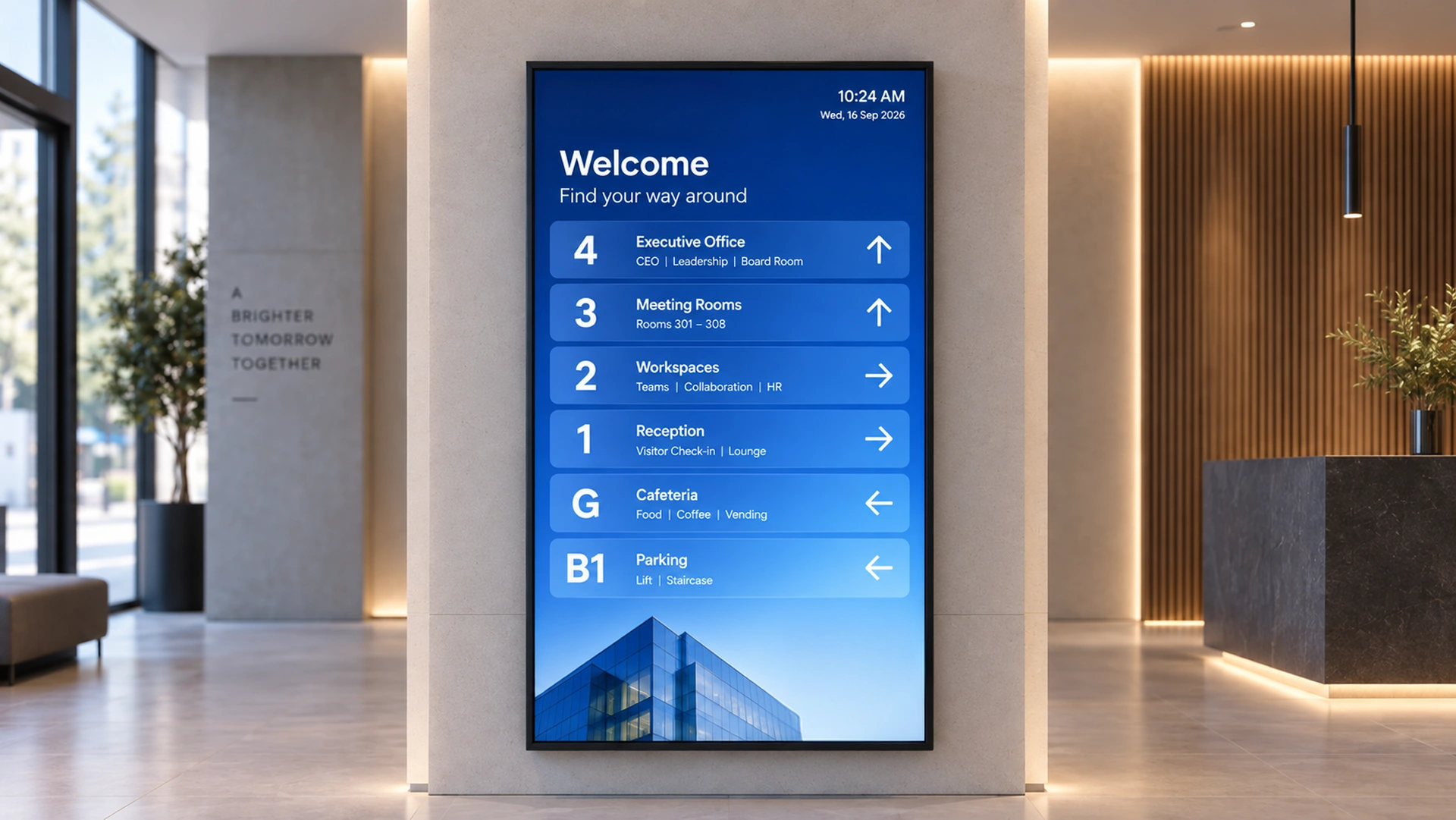
Portrait lobby kiosk in a corporate building showing a searchable tenant directory
Customer Stories

Customer Story: [Customer Name TO BE PROVIDED]

A multi-tenant [building type: TO BE PROVIDED, e.g., corporate campus or medical office portfolio] deployed Pickcel's building directory across [N buildings: TO BE PROVIDED] to replace printed lobby boards that could not keep pace with tenant turnover. Building staff and select tenant contacts now update listings directly from a browser, and portfolio management reviews directory status for every site from a single dashboard.

Full case study: [link to be added once produced]

[Customer Name TO BE PROVIDED]

Property manager reviewing a multi-building directory dashboard
Integrations

Integrations for Property and Tenant Systems

A digital lobby directory works best when it reflects the same tenant roster a property management system already tracks, rather than a second, manually maintained list.

Property management systems

Pickcel connects to property management systems to pull tenant name, suite, and lease-status changes, so a directory listing can be flagged for review automatically when a lease event occurs.

Visitor management and access control

Visitor management and access control systems can share badge or check-in data with the directory for buildings that combine wayfinding with visitor registration.

Pickcel API

Custom integrations to a property's existing tenant database are available through the Pickcel API for portfolios that need directory data to stay in step with a system of record.

Related Reading

You Might Also Like

Pickcel building directory app on a lobby screen

Pickcel's Building Directory App

See the app-level feature spec and editor mechanics.

Pickcel's Building Directory App →
Digital wayfinding signage display in a facility lobby

Wayfinding Signage

The adjacent solution, routing rather than listings.

Wayfinding Signage →
Digital building directory in a modern office lobby

What Are Digital Building Directories?

The category primer.

What Are Digital Building Directories? →
Comparison

Digital Directory vs. Printed Board

The comparison that matters to a facilities team is not digital signage versus print in general. It is what happens the next time a tenant moves.

Listing change turnaround

Pickcel Digital Directory

Published from a browser, no vendor visit needed

Printed Directory Board

Design proof, print run, vendor visit: typically weeks

Cost per change

Pickcel Digital Directory

No incremental cost per listing edit

Printed Directory Board

Recurring cost with each tenant change

Multi-building visibility

Pickcel Digital Directory

One dashboard across every building in the account

Printed Directory Board

One board, one building, no portfolio view

Search

Pickcel Digital Directory

Searchable by name, suite, or category

Printed Directory Board

Alphabetical list only

Printed Directory BoardPickcel Digital Directory
Listing change turnaroundDesign proof, print run, vendor visit: typically weeksPublished from a browser, no vendor visit needed
Cost per changeRecurring cost with each tenant changeNo incremental cost per listing edit
Multi-building visibilityOne board, one building, no portfolio viewOne dashboard across every building in the account
SearchAlphabetical list onlySearchable by name, suite, or category

See Your Directory Live in a 20-Minute Walkthrough

Bring a real tenant roster to the call and watch a listing publish to a screen while you are on it. Book a time that works for your team.

No credit card required

FAQ

Frequently Asked Questions

A front-desk employee, building manager, or an authorized tenant contact can update a listing directly from a browser, no separate software or install required. The editor uses the same plain-text and dropdown fields as any web form. Most first-time users complete a listing change in under two minutes without formal training. Role permissions decide who can touch which listings.

For pricing information, visit
Pickcel pricing plans. →

Plans are available for a single building or a full portfolio.

Need help with rollout or tenant permissions?

Pickcel's support team is available via live chat and documentation.

Product

  • Software Features
  • Digital Signage Hardware
  • Digital Menu Board Software
  • Digital Signage Player
  • Interactive Kiosk
  • OTT Digital Signage Software
  • Queue Management Software
  • Visitor Management software
  • On-premise Digital Signage

Enterprise

  • Integrations & Automation
  • On-premise Digital Signage
  • Our Services

Solutions

  • Corporate Communication
  • Retail Digital Signage
  • Digital Signage Hospitality
  • Multi Channel Employee Communication
  • Restaurant Digital Signage
  • Banking & Finance Signage
  • Transportation Digital Signage
  • Digital Product Catalogue
  • Electronic Bulletin Board
  • Employee Communication App
  • Wayfinding Signage

Resources

  • Case Studies
  • What is digital signage?
  • Digital Signage Blog
  • Apps
  • Pricing
  • FAQ

Company

  • About Us
  • Contact Us
  • Support
  • Press Release
  • Careers

Trust & Compliance

  • Privacy Policy
  • Terms of Service
  • Refund Policy
  • Data Processing Addendum
  • Sub-processors
  • Security
  • Cookie Policy

Partner program

  • White Label Digital Signage
  • Reseller Digital Signage
Capterra4.6G24.6GoodFirms4.6

© 2026 LaneSquare Technology Pvt Ltd. All rights reserved.