Why Enterprises Should Avoid
OEM-Bundled CMS
"We use Samsung CMS, and it works fine. Why complicate it?"
This is a common starting point for enterprise teams rolling out signage quickly. OEM-bundled CMS (content management software packaged directly with display hardware) feels convenient. One vendor, fewer approvals, faster setup, less hassle.
But that convenience hides long-term execution and financial risk.
Here's why deploying CMS from screen manufacturers creates structural limitations for enterprise rollouts — and why CMS-first platforms exist as a separate category.
Leadership Takeaway
- OEM-bundled CMS feels convenient at rollout, but creates constraints over time.
- Risk comes from tying both software and screens to one vendor, not from using hardware itself.
- Over 3–5 years, this model leads to higher hardware spend, operational inefficiency, and forced platform changes.
- Enterprises avoid this by separating the CMS from the screen sellers and treating signage as a platform decision.
Who This Is For
This is for teams treating digital signage as a long-term business system, especially when their signage system:
- Spans multiple locations
- Requires IT and procurement involvement
- Is expected to expand over the next few years
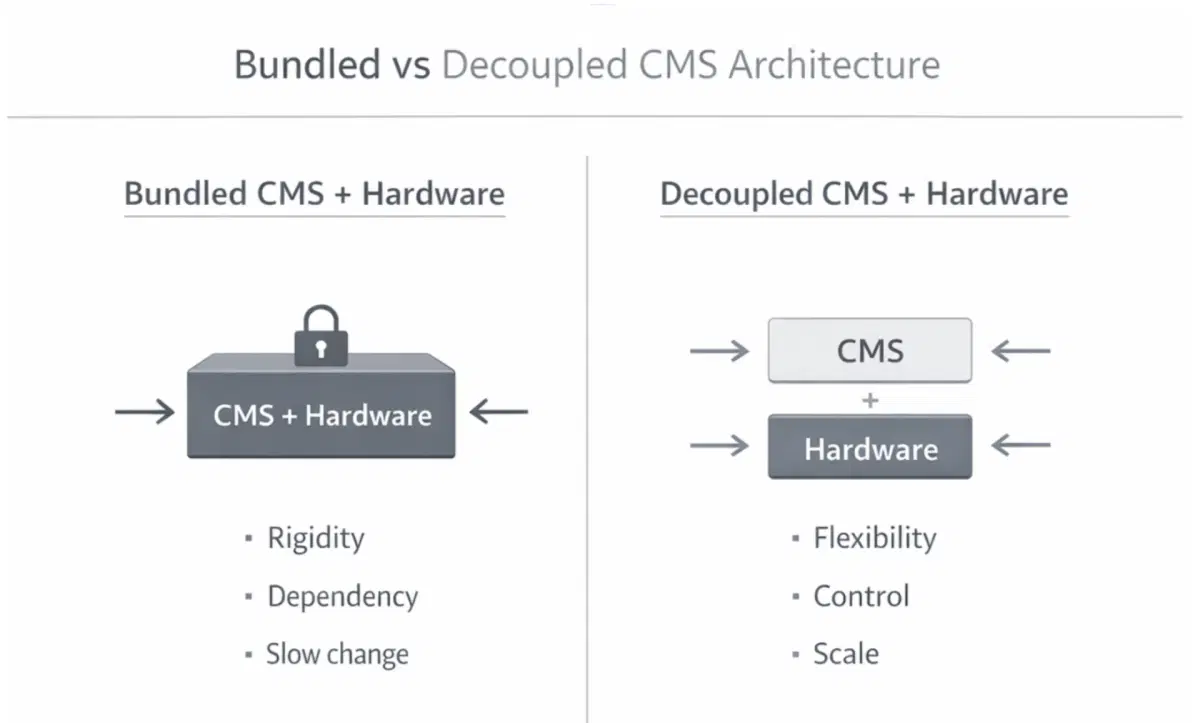
1. Vendor Lock-In: Loss of Supplier Choice and Pricing Leverage
When enterprises use OEM-bundled CMS platforms (such as Samsung MagicINFO, LG SuperSign, or Panasonic CMS), the software is tightly optimized for that manufacturer's displays.
What this means in practice:
- Samsung CMS works only with Samsung screens
- LG CMS works only with LG screens
- Switching to Philips, Sony, Android-based players, or BrightSign later becomes difficult or impossible
- CMS changes often force screen replacement, not simply software migration
For procurement and IT teams, this creates vendor concentration risk in the long run and removes supplier negotiation leverage. What started as convenience becomes a sourcing constraint.
2. Limited Customization: Inability to Support Real Business Workflows
Screen manufacturers build CMS platforms that are optimized for basic playback, resulting in rigid systems with limited flexibility for organization-specific requirements. As rollouts mature, teams typically need:
- Custom approval workflows
- Integration with HRIS, ERP, BI tools, or internal dashboards
- Location-based content rules (by region, store type, or department)
- Rule-based scheduling tied to business conditions (time, location, campaigns, or inventory)
For OEM models, the CMS exists to sell displays. So it rarely evolves to the maturity large teams demand. As a result, companies end up building parallel processes, manual workarounds, or external tools to compensate.
3. Weak Enterprise Security: Increased Compliance and Approval Friction
Most OEM-bundled CMS platforms are not built for regulated environments with strict security and compliance requirements:
- Multi-factor authentication (MFA)
- Single sign-on (SSO)
- Role-based access control
- Audit logs and governance visibility
- Alignment with certifications such as ISO 27001 or SOC 2
This creates a direct adoption barrier for industries that operate under high data risk and access accountability standards — including healthcare, BFSI, corporate networks, and government projects.
4. Deployment Restrictions: Loss of Hosting and Data Control
Many OEM CMS platforms are cloud-only or tightly tied to the vendor ecosystem. For organizations with strict data residency needs or internal network restrictions, this creates immediate friction.
CMS-first platforms are built to support:
- On-premise digital signage rollout inside the organization's own data center
- Private cloud environments
- Hybrid setups that integrate with internal systems
5. Inadequate Content Support: Rising Internal Operational Load
As signage networks scale, content execution complexity increases. Display seller CMS solutions are not built to support these content needs and typically do not provide:
- Content scheduling and campaign management support
- Content creation and design support
- Advanced scheduling and playback control
- Multi-location campaign rollout
- Dynamic data-driven content updates
- Creative approvals and collaboration
- Performance tracking and optimization
Without CMS-specific service support, this burden shifts directly to internal marketing and delivery teams.
6. No Managed Services Layer: Self-Managed Scaling Risk
OEM vendors typically optimize support around screen warranties and not CMS operations. Enterprise digital signage rollouts require:
- End-to-end screen and network oversight (uptime, connectivity, playback health)
- 24/7 system monitoring
- Proactive issue resolution
- Outsourced day-to-day support after rollout
CMS-first vendors invest in a managed ownership model covering onboarding, ongoing monitoring, platform upkeep, and a long-term customer success program. This difference directly impacts deployment stability and internal IT workload.
The Business Reality of OEM-Bundled vs Independent CMS platforms
Over a 3–5 year lifecycle, OEM-bundled CMS models typically create 25-40% higher total ownership burden compared to CMS-first models due to:
Display screen cost inflation
→ 15–25% higher expenses due to restricted vendor sourcing
Operational inefficiencies
→ 20–30% higher operating expenses (OPEX) from manual workarounds, limited automation, and integration constraints
Replatforming risk
→ 30–50% cost premium when CMS and hardware must be replaced together after early scalability limits
Internal IT burden
→ 10–20% higher workload due to limited CMS-centric support
What Enterprise Leaders Need Clarity on Before Committing to a CMS
If signage is a multi-year investment, the CMS decision shouldn't be rushed. It is not merely an enterprise signage feature checklist to tick off — it's a platform decision that affects scale, cost, and control. Before signing with any vendor, teams usually ask questions like these:
1. Are we locking ourselves into one screen brand here?
- If we change displays in two or three years, does everything else have to change too?
- What happens when procurement wants a cheaper or different supplier?
2. Will IT even approve this?
- Does it support SSO and MFA without workarounds?
- Can we clearly control who can publish what and see an audit trail?
- Are we going to get stuck in a six-month security review later?
3. Where does this actually run?
- Can some locations sit on our internal network while others stay cloud-based?
- If legal or compliance pushes for on-premise or private cloud later, are we covered?
4. Can this handle how we actually work day to day?
- Multiple teams, approvals, frequent updates, and different locations?
- Will scheduling, campaigns, and changes stay manageable?
- Do they help with content execution, or does everything land on our team?
5. What happens when our workflows don't fit the tool?
- Can we adapt approvals, roles, and rules, or is it 'not supported'?
- Can this plug into our HR systems, dashboards, or internal tools?
- Are we signing up for workarounds from Day 90 onward?
6. Who owns this once it's live?
- Who's monitoring it day to day?
- Who do we call when something breaks at 9 pm?
- Are we buying a platform partner or just licenses and a support ticket queue?
Where Pickcel Fits in the Equation
Pickcel is built as a CMS-first, hardware-agnostic platform that works across WebOS, Tizen, Android, BrightSign, Linux, and Windows for organizations operating large, distributed screen networks.
Teams use Pickcel to:
- Avoid being tied to a single hardware vendor
- Keep pricing power during screen upgrades
- Scale content delivery without increasing headcount
- Meet access control and internal IT requirements easily
- Keep total ownership costs under control as networks grow
If you're evaluating Samsung CMS, LG SuperSign, Panasonic CMS, or other OEM-bundled platforms — or planning to scale beyond pilot deployments — an early architecture review can prevent costly rework later.